Room details
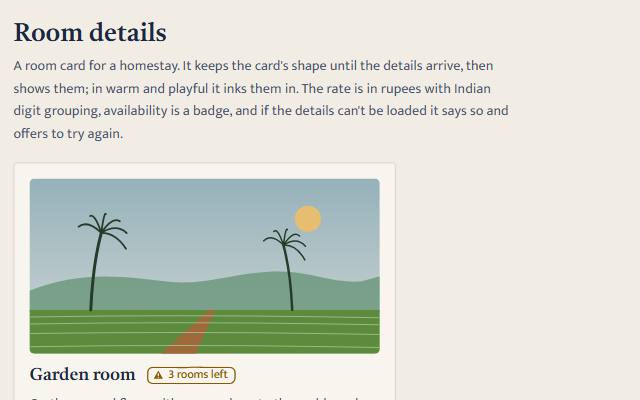
A guest-facing room card for a homestay. A skeleton stands in until the room's details really arrive, then inks them in: a painted view, name, beds, the rate in rupees with Indian digit grouping, what is included, and availability as a badge. If the details cannot be loaded it says so plainly, with Try again.
quiet warm playful
Open the live demo
npx susegad add room-details
Stands on: Badge, Core, Core: components, Engine, Skeleton, Tokens
The prompt
the prompt
The prompt
Build a room card for a homestay's booking page from two library components. Load the room's details from a source with load(id) → Promise<room>; for the demo, write a pure, seeded fake source with three rooms (a garden room, a balcão suite and the whole house by the week), a seeded delay where the network would be, and failures only when the page asks for one. Keep the load as a pure state machine (idle, loading, loaded, failed) in which only the latest request may settle the card. While loading, show an <sg-skeleton busy shape="card" label="the room details">; when the details arrive, put the card's content inside the skeleton beside its own parts and clear busy, so it announces "The room details loaded" and, in warm and playful, inks the outlines in. Show a small painted view from the room in inline SVG with token colours, the name with an <sg-badge> for availability ("2 rooms left" as a warning, "Available" as success, "Fully booked" as neutral), who it sleeps and in what beds, the rate in rupees with Intl.NumberFormat('en-IN') so ₹1,25,000 reads the Indian way, and what is included. If the load fails, hide the skeleton without clearing busy, and show "We couldn’t load the room details. Check your connection and try again." in a role="alert" line with a Try again button that moves focus to the card and loads again. Never show the skeleton for a set time and never hide it early. Let the page's register choose the look through the two components: in quiet, flat blocks that give way to the details with a short fade; in warm, the card sketched in pencil and inked in when the details arrive; in playful, soft colour and a wobble on twos while waiting. With reduced motion the details simply appear. Keep availability in words first, with the badge's tone and shape as backup, and offer "Ask about other dates" instead of "Choose your dates" when the room is fully booked. Name the card by its heading once it has one, and make every action a real button.
Words to code
| When you say | Technique | What happens |
|---|---|---|
| a seeded delay where the network would be | fake transport | The source waits through an injected wait(ms): a timer on the page, an instant promise in the tests, with the same seeded delays either way. |
| only the latest request may settle the card | request ids | Each load gets a number; reduce ignores an answer whose number is not the current one. |
| put the content inside the skeleton beside its own parts | composition | The skeleton keeps its status line and drawing layer; the recipe appends the content next to them rather than replacing its children. |
hide the skeleton without clearing busy | real arrival | Clearing busy means "it arrived". On failure the skeleton is hidden instead, so nothing claims an arrival. |
Intl.NumberFormat('en-IN') | Indian digit grouping | 125000 becomes ₹1,25,000 and 12500000 becomes ₹1,25,00,000, with no hand-written formatting. |
| Let the page's register choose the look | registers | The recipe draws only the painted view. The skeleton and the badge read data-register and load their own skins, so one attribute on the page changes the whole card. |
| moves focus to the card | focus management | The button that was pressed goes away while loading, so focus goes to the card (tabindex -1) instead of the page body. |
A room card for a homestay's booking page. It keeps the card's shape until the room's details arrive, then shows them (in warm and playful, inking them in): a view from the room, the name, who it sleeps and in what beds, the rate in rupees, what is included, and whether there is a room left. If the details cannot be loaded, it says so and offers to try again.
It composes two library pieces:
| Piece | Used for |
|---|---|
<sg-skeleton> | the card's placeholder, from the first moment until the details arrive, and never longer or shorter |
<sg-badge> | availability: "2 rooms left" (warning), "Available" (success), "Fully booked" (neutral) |
Files
| File | What it is |
|---|---|
source.js | A fake source, pure and seeded: three rooms, a seeded delay where the network would be, and failures only when the world says so (failNext()). Swap it for anything with load(id) → Promise<room>. |
room.core.js | The words (STRINGS), rupee formatting, availability, the load state machine and the view, all pure. |
recipe.js | The wiring: mountRoomDetails(card, { source, room }), plus stillRoom for the gallery of states. |
recipe.css | The card's look: layout, the painted view's frame and the type, all from tokens. |
index.html | The demo: a live card, two buttons standing in for the network, and every state of the card. Works in a builder's project too. |
recipe.test.js | Tests for the source, the formatting, the machine and the view. |
Put it on a page
<link rel="stylesheet" href="susegad/tokens/fonts.css">
<link rel="stylesheet" href="susegad/tokens/tokens.css">
<link rel="stylesheet" href="susegad/components/skeleton/skeleton.css">
<link rel="stylesheet" href="susegad/components/badge/badge.css">
<link rel="stylesheet" href="susegad/recipes/room-details/recipe.css">

<article class="room" data-room="garden"></article>

<script type="module">
  import { mountRoomDetails } from './susegad/recipes/room-details/recipe.js';
  const source = { load: id => fetch(`/api/rooms/${id}`).then(r => (r.ok ? r.json() : Promise.reject(new Error(r.statusText)))) };
  mountRoomDetails(document.querySelector('.room'), { source });
</script>
Your source returns { name, summary, sleeps, beds: { double, single }, rate, per: 'night' | 'week', included: [...], left }. The card's look is in recipe.css, which the snippet links. Change it, or replace it with your own.
What moves, and why
- The skeleton is shown the moment a load starts and stays until the source answers. There is no minimum time and no timer; the only waiting is the source's own.
- Only the latest load may change the card. A slow answer to an older request is ignored, so pressing "Load it again" twice never shows the first answer after the second.
- On failure, the skeleton is hidden but stays busy, so nothing announces "The room details loaded" when they did not. The error says what happened and what to do, in a
role="alert"line with a Try again button. - Try again moves focus to the card, so keyboard and screen reader users are not left on a button that has gone.
- Rates use
Intl.NumberFormat('en-IN'): ₹3,200 a night, ₹1,25,000 a week. - Availability is words first ("Fully booked"), with the badge's tone and shape as backup. A fully booked room offers "Ask about other dates" instead of "Choose your dates".
Registers
Everything comes from the two components: quiet shows flat blocks and fades to the details; warm sketches the card in pencil and inks the outlines when the details arrive; playful adds colour and a wobble on twos while waiting. Reduced motion shows the details at once.