Form
A native form the browser validates, which says what happens when you send it. Adds a field note to every field, summarises problems and focuses the first, and follows an sg-submit promise (or posts itself with fetch): Sending only while work is pending, then Sent or why it could not send, in one polite voice.
quiet warm playful
Open the live demo
npx susegad add form
Stands on: Core, Core: components, Field note, Loader, Sound, Stamp, Toast, Tokens
The prompt
the prompt
A native form the browser validates, which says in words what happens when you send it.
Without JavaScript it validates and submits on its own. With it, every field says what is wrong in its own note, and the submit says "Sending", "Sent" or why it could not send.
<link rel="stylesheet" href="susegad/components/form/form.css">
<link rel="stylesheet" href="susegad/components/field-note/field-note.css">
<link rel="stylesheet" href="susegad/components/loader/loader.css">
<link rel="stylesheet" href="susegad/components/stamp/stamp.css">
<link rel="stylesheet" href="susegad/components/toast/toast.css">
<script type="module" src="susegad/components/form/form.js"></script>

<sg-form>
  <form action="/enquire" method="post">
    <label for="name">Your name</label>
    <input id="name" name="name" required>
    <button>Send</button>
  </form>
</sg-form>

<script type="module">
  document.querySelector('sg-form').addEventListener('sg-submit', e => {
    e.detail.respondWith(fetch('/enquire', { method: 'POST', body: e.detail.formData }).then(r => {
      if (!r.ok) throw new Error(`the server answered ${r.status}`);
      return { message: 'Sent. We will write back within a day.' };
    }));
  });
</script>| Attribute | Values | What it does |
|---|---|---|
fetch | present or absent | The form posts itself to its action and stays on the page. A JSON answer may carry { message, stamp, detail, tone, reset }. |
notes | off | Do not add a field note to fields that have none. |
The prompt
Make a form web component that wraps a native <form> and never replaces it: without JavaScript the browser validates it with the fields' own attributes and submits it. With JavaScript, turn off the browser's bubbles (set novalidate from script, never in the markup) and give every field that validates a field note, unless it has one. On a submit with problems, show every note, move focus to the first field with a problem as the browser would, and write a summary under the button ("Check 2 fields: Your name, Phone or email.") without reading it aloud, because the focused field reads its own note. On a valid submit, fire an sg-submit event with the form data and a respondWith(promise) hook. If a listener takes it, or the form has a fetch attribute, stop the native submit and follow the promise; otherwise let the browser submit. Say "Sending" only if the work is still pending after 150 ms, so fast work never flashes a loader, and never on a timer of its own. Mark the button aria-disabled and the form aria-busy while sending, ignore a second submit, then say "Sent" (with the answer's message) or why it could not send, keeping every word the person typed. Say each state once, in one polite status line. A failure is also an error toast, so the line stays silent for it. Give it three registers. Quiet: the states are words only. Warm: a Loader beside the button while sending, carrying the words, and a Stamp that lands for "Sent" with at most a short detail, above the words; both are drawn in an aria-hidden box because the words are said by the status line. Playful: the same, with the Loader's and Stamp's own playful skins. With reduced motion the Loader and the Stamp show their finished state, and the words carry every state in every register.
Words to code
| When you say | Technique | What happens |
|---|---|---|
| wraps a native form and never replaces it | native first | The markup has no novalidate. The element sets form.noValidate when it runs, so without JavaScript the browser's own validation and submission are untouched. A browser check submits the page with JavaScript off. |
| give every field that validates a field note | composition | For each control with willValidate, the form adds <sg-field-note for="…" validate> after it (after the fieldset for radios, after the label for a checkbox), unless one exists. |
| move focus to the first field with a problem | focus | The form calls checkValidity() on each field with a problem, which fires its own invalid event. Each note shows itself, and the first one's note focuses its field. |
| a summary … without reading it aloud | live regions | The status line is a polite live region that the form sets to aria-live="off" for the summary and for failures. fieldName() drops a trailing colon and "(optional)" from each label. |
a respondWith(promise) hook | events | sg-submit carries FormData (with the submitter's name and value) and a hook, like a service worker's respondWith. Nothing is sent unless a listener or fetch sends it. |
| only if the work is still pending after 150 ms … never on a timer of its own | the work's own pace | A timeout starts with the real promise and shows "sending" only if the promise has not settled. A browser check records the states: a quick answer goes straight from idle to sent. |
| ignore a second submit | state machine | next() keeps "sending" on another submit or a stray problem, and only a send under way can settle. Unit-tested. |
| keeping every word | forms | Nothing resets the form unless the answer says reset: true. On failure, the words stay and focus stays where it was. |
| a Loader … a Stamp that lands | components | The warm skin creates <sg-loader label="…"> and <sg-stamp> inside the form's aria-hidden art box, loading their modules only when needed. The stamp shows its word and, at most, the answer's short detail; the full message stays in the words under it. |
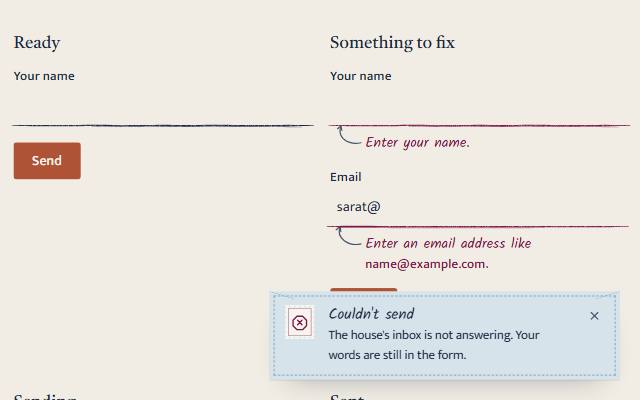
| also an error toast | components | On failure the form calls toast() with the error tone: "Couldn't send", then what happened and "Your words are still in the form." |
<sg-form> wraps a native <form>. Without JavaScript, the browser validates and submits it. With JavaScript, every field says what is wrong in its own note, a submit with problems says how many and focuses the first, and a good submit says "Sending", then "Sent" or why it could not send.
Use
<link rel="stylesheet" href="susegad/components/form/form.css">
<link rel="stylesheet" href="susegad/components/field/field.css">
<link rel="stylesheet" href="susegad/components/field-note/field-note.css">
<link rel="stylesheet" href="susegad/components/loader/loader.css">
<link rel="stylesheet" href="susegad/components/stamp/stamp.css">
<link rel="stylesheet" href="susegad/components/toast/toast.css">
<script type="module" src="susegad/components/field/field.js"></script>
<script type="module" src="susegad/components/form/form.js"></script>

<sg-form>
  <form action="/enquire" method="post">
    <sg-field><label for="name">Your name</label><input id="name" name="name" required></sg-field>
    <sg-field><label for="contact">Phone or email</label><input id="contact" name="contact" required></sg-field>
    <button>Send</button>
  </form>
</sg-form>
Keep novalidate out of the markup: the element sets it when it runs, so the page without JavaScript keeps the browser's validation.
Sending
The form fires sg-submit on a valid submit. You choose who sends it:
form.addEventListener('sg-submit', e => {
  e.detail.respondWith(
    fetch('/enquire', { method: 'POST', body: e.detail.formData }).then(r => {
      if (!r.ok) throw new Error(`the server answered ${r.status}`);
      return { message: 'Sent. We will write back within a day.', stamp: 'Sent' };
    }),
  );
});respondWith(promise): the form follows the promise. Resolve with{ message, stamp, detail, tone, reset }(all optional); reject with anErrorwhose message says what happened in plain words ("the server answered 503").- The
fetchattribute: the form posts itself to itsactionwith itsmethodand stays on the page. A JSON answer can carry the same{ message, stamp, detail, tone, reset }, and atext/plainanswer becomes the message. - Neither: the browser submits as usual, and the form says "Sending" until the page moves on.
Attributes, events, properties
fetch | post to action and stay on the page |
notes="off" | do not add field notes to fields without one |
register | quiet, warm, playful (inherited) |
sg-submit | { formData, submitter, respondWith(promise) } on a valid submit |
sg-form-state | { state, words } on each change |
form.status | idle, invalid, sending, sent, failed |
data-state | the same, on the element, for your CSS |
data-summary-name (on a field) | a short name for the summary of problems, when the label is a whole sentence: <input type="checkbox" name="rules" required data-summary-name="House rules"> gives "Check 1 field: House rules." |
States
| State | Words (warm) | Drawn (warm and playful) |
|---|---|---|
| invalid | "Check 2 fields: Your name, Phone or email." Focus goes to the first; not read aloud | nothing |
| sending | "Sending your message." Only if the work takes more than 150 ms | a Loader |
| sent | the answer's message, or "Sent. Thank you." (always shown) | a Stamp: its word ("Sent") and the answer's short detail |
| failed | "Couldn't send: what happened. Your words are still here; try again when you're ready." | nothing; an error toast says it |
Quiet uses the same states with plainer words ("Sending.", "Sent.") and draws nothing. Resetting the form returns it to idle.
A successful submit plays confirm through the sound switch (packages/sound); a failed one already gets its sound from the error toast it raises, so the form does not also play one.
Accessibility
- Without JavaScript, the browser's own validation and submission work unchanged.
- Each state is said once, in one polite status line. The summary of problems is not read aloud, because focus moves to the first problem and the field reads its own note. A failure is not read by the line, because its toast is an alert.
- While sending, the button keeps its focus and has
aria-disabled="true", and the form hasaria-busy. A second submit is ignored. - Words typed are never cleared unless the answer asks for it.
Checks
node --test packages/components/form/form.test.js covers the state machine, the words and the summary. node packages/components/form/form.check.mjs checks the page without JavaScript (blocked when invalid, submitted when valid), keyboard submits, notes and focus, the silent summary, no loader for quick work, the loader for slow work, the ignored second submit, failure with its toast, reset, native submission with no handler, and fetch.