File drop
A native file input you can also drop files onto. Without JavaScript it is the browser's own input; with it, the real input covers a drop zone, and the element checks accept, size and count, lists each file with a Remove button, and says every change in words.
quiet warm playful
Open the live demo
npx susegad add file-drop
Stands on: Core, Core: components, Tokens
The prompt
the prompt
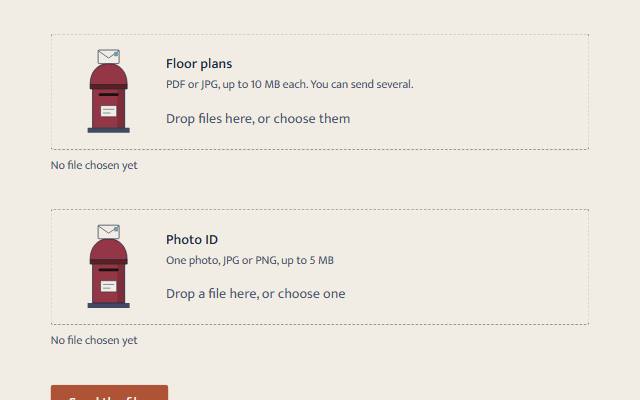
Post your files: the letter goes into the box only when they are really kept.
A file input you can also drop files onto. Without JavaScript it is the browser's own file input and submits with the form. With it, the real input covers a drop zone. The element checks what the browser does not check on a drop, lists what was chosen, and says every change in words.
<link rel="stylesheet" href="susegad/components/file-drop/file-drop.css">
<script type="module" src="susegad/components/file-drop/file-drop.js"></script>

<form action="/send" method="post" enctype="multipart/form-data">
  <sg-file-drop max-size="10 MB">
    <label for="plans">Floor plans <span>PDF or JPG, up to 10 MB each</span></label>
    <input type="file" id="plans" name="plans" accept=".pdf,image/jpeg" multiple>
  </sg-file-drop>
</form>
The prompt
Build a file drop as a light-DOM custom element, <sg-file-drop max-size="10 MB">, around a native <label> and <input type=file>, so that without JavaScript it is the ordinary file input and the form sends the files. With JavaScript, move the label and input into a drop zone and stretch the input over the whole zone, transparent, so clicking, Enter and Space, and dropping onto it are all the browser's own, and show the input's focus on the zone. Also catch drops on the rest of the zone and put the files into the input itself, so the form still sends them. After every change, check what the browser does not check on a drop: the accept list read as the browser reads it, a size limit, and one file for an input without multiple. Keep what may stay by rebuilding the input's file list, and say in a status line what happened: "2 files chosen" and, for anything turned away, "setup.exe isn't a PDF or JPG, so it wasn't added." List each file with its size in words and a Remove button named for the file, and move focus to the next Remove button (or the input) when one goes. Give it three registers. Quiet: a dashed hairline zone that turns solid while a file is dragged over it, and nothing moves. Warm: a small pillar post box beside the words, with a letter waiting above the slot. It lifts to the slot while a file is dragged over, and is posted through the slot only when files are really kept, clipped so it vanishes at the slot. A turned-away file makes it shake. Playful: the letter drops in faster, the box gives a little as it lands, and three short marks say thunk. With reduced motion, change states without animation.
Words to code
| When you say | Technique | What happens |
|---|---|---|
| stretch the input over the whole zone, transparent | native first | The real input lies over the zone with opacity 0. Every click, key and drop on it is the browser's own, and it stays in the form. |
| put the files into the input itself | input.files | A drop elsewhere on the zone sets input.files = event.dataTransfer.files and fires change, so the form sends exactly what is listed. |
the accept list read as the browser reads it | pure matching | Extensions, image/* wildcards and exact types, ignoring case, in a pure function tested in Node. The browser's picker filters by accept; a drop does not, so the element does. |
| keep what may stay by rebuilding the input's file list | DataTransfer | A new DataTransfer() holds the files that pass, and its files replaces the input's. |
| say in a status line what happened | live region | One role="status" line: the count, then a sentence for each file turned away, in the person's terms ("a PDF or JPG", "over 10 MB"). |
| clipped so it vanishes at the slot | SVG clip path | The letter is clipped to the area above the slot. It slides down in front of the box and disappears exactly as it passes into it. |
| only when files are really kept | motion that follows the work | The letter is posted on a real change that kept at least one file, never on a timer or on hover alone. |
<sg-file-drop> is a file input that also takes dropped files, checks them, lists them, and still works as a plain file input without JavaScript.
Usage
<link rel="stylesheet" href="susegad/components/file-drop/file-drop.css">
<script type="module" src="susegad/components/file-drop/file-drop.js"></script>

<form action="/send" method="post" enctype="multipart/form-data">
  <sg-file-drop max-size="5 MB">
    <label for="id">Photo ID <span>One photo, JPG or PNG, up to 5 MB</span></label>
    <input type="file" id="id" name="id" accept="image/jpeg,image/png" required>
  </sg-file-drop>
  <button>Send</button>
</form>
Put a <label for> and an <input type="file"> inside. Everything about what may be sent lives on the input: accept, multiple, required, name. The form sends the files the normal way.
Attributes, properties and events
| Name | What it does |
|---|---|
max-size | The largest file allowed, like 10 MB, 500 KB or a number of bytes. Larger files are turned away with a sentence saying so. |
handoff | For pages that take files the moment they arrive, like an uploader. The zone hands each choice or drop to the page and posts the letter; the page does the checking, listing and saying (the file-upload recipe uses its field note and progress list). |
register | quiet, warm or playful; overrides the page's register. |
remove(i) (method) | Removes the file at index i. |
sg-files (event) | Fires after every change, with detail: { files, messages }. |
Say the limits in the label's hint as well, for example "PDF or JPG, up to 10 MB each". The element also checks them, and says so if a file doesn't fit.
Registers
- Quiet: a dashed hairline zone that turns solid while you drag a file over it. Nothing moves.
- Warm: a pillar post box. The letter lifts to the slot while you drag a file over, and is posted when files are kept.
- Playful: the letter drops in with a thunk.
- Reduced motion: the states change without animation.
Accessibility
- Without JavaScript it is the native file input, labelled by your label.
- With JavaScript it is still the native input, stretched over the zone, so Tab reaches it, Space or Enter opens the file chooser, and the label names it. The zone shows its focus ring.
- One status line says how many files are chosen and why any were turned away.
- Each file in the list has a Remove button named for it ("Remove plan.pdf"). Removing one moves focus to the next Remove button, or back to the input.
requiredworks as usual: the form waits, and focus goes to the input.- The post box is
aria-hidden.
What moves, and why
The letter is posted only when files are really kept. Nothing is uploaded until the form is sent, so the element says "chosen", not "uploaded".