Field note
The note under a form field that says what is wrong and how to fix it. Follows constraint validation with its own wording (or shows a server message), never nags on the first try, wires aria-describedby and aria-invalid, focuses the first problem on submit.
quiet warm playful
Open the live demo
npx susegad add field-note
Stands on: Core, Core: components, Tokens
The prompt
the prompt
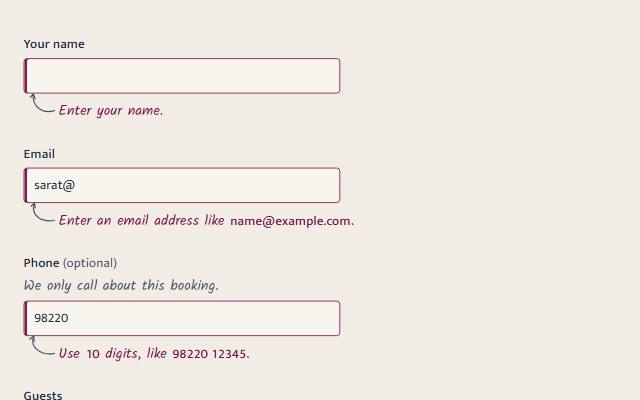
The note under a form field that says what is wrong and how to fix it: "Enter an email address like name@example.com."
It waits until you leave a field you changed, follows your typing once it is showing, and goes the moment the value is right.
<link rel="stylesheet" href="susegad/components/field-note/field-note.css">
<script type="module" src="susegad/components/field-note/field-note.js"></script>

<label for="email">Email</label>
<input id="email" type="email" required>
<sg-field-note for="email" validate></sg-field-note>

<!-- a server's message, shown as written -->
<sg-field-note for="dates">Those dates are booked. The next free nights start on 16 October.</sg-field-note>| Attribute | Values | What it does |
|---|---|---|
for | a field's id | The field it belongs to. Absent: the nearest field before it. |
validate | present or absent | Follow the browser's constraint validation and word the message. Absent: show the text the note holds. |
tone | error, hint | hint is a margin note that never marks the field invalid. |
data-value-missing, data-type-mismatch, data-pattern-mismatch, … | text | Your wording for one check, beating ours. |
The prompt
Make an inline error web component, <sg-field-note for="email" validate>, that sits under a form field and uses the browser's own constraint validation: required, type, pattern, minlength, maxlength, min, max and step. Choose the message from the first failing check in the order a person should fix things, and word it to say what happened and how to fix it, in the person's terms ("Enter your email.", "Use at least 8 characters. You have 5."), never blaming them. Let the page override any check's wording with a data attribute, and show setCustomValidity() messages as they are. Do not show anything while someone types into a field for the first time. Show the note when they leave a field they changed or try to submit, then update it as they type and remove it the moment the value is valid. On a submit, show every note, move focus to the first field with a problem, and keep the other notes silent so they do not all speak at once. While a note shows an error, add its id to the field's aria-describedby without removing ids already there, set aria-invalid="true" on the field, start the note with a visually hidden "Error:", and make the note a polite live region that exists before any message. Without validate, show whatever text the note holds, so a server can render an error. Give it three registers. Quiet: small text in the danger colour with a circled mark, fading in within 120 ms. Warm: a margin note in the hand face, with examples, numbers and addresses set in the body face so a 1 never reads as an l, and a pencil arrow that hooks up into the field, seeded so each arrow is a little different and always the same, drawn in one stroke when the note appears. Playful: the same, inked on as it appears: the arrow is drawn, the words are written left to right, then a wavy line underlines them. Under reduced motion, show it all at once.
Words to code
| When you say | Technique | What happens |
|---|---|---|
| the browser's own constraint validation | native first | The note reads field.validity and validationMessage. The invalid event is cancelled, so the browser's bubble never covers the page, and a form with novalidate still gets its notes. |
| the first failing check in the order a person should fix things | ordering | CHECKS puts valueMissing first, then badInput, typeMismatch and the rest. pickMessage() takes the first that fails. Unit-tested. |
| say what happened and how to fix it | copy | STRINGS holds one function per check that uses the field's own limits and label ("Enter a number from 1 to 6.", "Enter your email."). Every string is in one place for the writer. |
| do not show anything while someone types … the first time | state machine | nextShown() tracks dirty and shown: input marks the field dirty; blur shows only a dirty, invalid field; once shown, input follows validity; submit and server messages show at once; reset clears. Unit-tested step by step. |
| move focus to the first field with a problem | focus | On invalid, each note checks in a microtask whether its field is the first invalid one in form.elements and whether focus is already on a problem. Only then does it focus its field, and only on a submit. |
| keep the other notes silent | live regions | A submit sets aria-live="off" on the notes for that update. The focused field reads its own note through aria-describedby, and later changes speak politely again. |
| without removing ids already there | ARIA | tokenList() adds or removes one id in a space-separated list. The note removes aria-invalid only if it set it. |
| examples, numbers, addresses | typography | In the hand face a 1 reads as an l. The warm skin's valueRuns() finds email and web addresses and numbers (digits joined by spaces, commas, colons, slashes or dashes) and wraps them in .sg-field-note__value, set in the body face with tabular figures. The text itself is unchanged; a test checks nothing is lost. |
| a pencil arrow … seeded | seed | arrowPath(seed) in the warm skin makes a cubic curve from the note up to the field, and a two-stroke head that follows the curve's last direction. A Park–Miller generator seeded from the note's id wobbles each point. |
| drawn in one stroke | WAAPI | The dash is set to the path's length and slid to 0: first the shaft, then the head. The animation is cancelled when it finishes. |
| the words are written left to right | clip-path | clip-path: inset(0 100% 0 0) to inset(0), with the time scaled to the message's length (up to 0.9 s). |
| a wavy line underlines them | seed | squiggle(width, seed) makes quadratic waves to the text's measured width, redrawn when the words change. |
| under reduced motion, show it all at once | still | Every skin checks ctx.motion === 'still' and skips its animations. |
<sg-field-note> is the note under a form field that says what is wrong and how to fix it. It follows the browser's own validation, or shows a message from your server. It never nags while someone is still typing their first try.
Use
<link rel="stylesheet" href="susegad/components/field-note/field-note.css">
<script type="module" src="susegad/components/field-note/field-note.js"></script>

<label for="email">Email</label>
<input id="email" type="email" required>
<sg-field-note for="email" validate></sg-field-note>

<label for="phone">Phone</label>
<input id="phone" pattern="[0-9 ]{10,12}">
<sg-field-note for="phone" validate data-pattern-mismatch="Use 10 digits, like 98220 12345."></sg-field-note>
<sg-field-note for="phone" tone="hint">We only call about this booking.</sg-field-note>
A server can render an error directly, or swap one in with htmx:
<sg-field-note for="dates">Those dates are booked. The next free nights start on 16 October.</sg-field-note>Style the field yourself from aria-invalid, which the note sets:
input[aria-invalid="true"] { border-color: var(--sg-danger); }Attributes
| Attribute | Values | Default |
|---|---|---|
for | the field's id | the nearest field before the note |
validate | follow constraint validation | absent: show the note's own text |
tone | error, hint | error |
data-value-missing, data-type-mismatch, data-pattern-mismatch, data-too-short, data-too-long, data-range-underflow, data-range-overflow, data-step-mismatch, data-bad-input | your wording for that check | ours |
register | quiet, warm, playful | inherited |
Methods and events
note.setMessage(text) | Show a message from the page or a server; empty text clears it. |
note.check() | Check the field now, as a submit would. Returns whether it is valid. |
note.shown, note.message | What it shows now. |
sg-field-note | Bubbles on every change: { shown, message, field }. |
When it shows
- Typing into a field the first time: nothing.
- Leaving a field you changed, while it is invalid: the note appears.
- While it shows: it follows your typing and goes as soon as the value is valid.
- Trying to submit: every note shows, focus goes to the first problem, and only that one is read aloud.
- Resetting the form clears every note.
Registers
| Look | Motion | |
|---|---|---|
| quiet | small text in the danger colour, a circled mark | fades in within 120 ms |
| warm | a margin note in the hand face, a pencil arrow hooked up into the field; examples, numbers and addresses in the body face | the arrow is drawn in one stroke |
| playful | the margin note, underlined with a wavy line | the arrow is drawn, the words written left to right, then the underline |
A hint is a margin note in the soft ink, with no arrow. Under reduced motion every register shows the finished note.
Starting over
A component that empties a field as part of a new choice (a date range starting a new stay empties the departure) dispatches sg-reset on the field. The note starts over, as on a form reset: nothing is wrong until the person leaves the field empty or submits.
Accessibility
- While the note shows an error, its id is in the field's
aria-describedby(ids already there are kept) and the field hasaria-invalid="true". The note removesaria-invalidonly if it set it. - A note never sits inside its field's label, where it would become part of the field's name. One written there steps out to just after the label when it connects. The field's name in a message ("Enter your departure.") comes from a copy of the label with notes, hidden text and pictures removed, or from
aria-labelledbywhen set. - The note starts with a visually hidden "Error:", so the tone is heard. The mark and the arrow are decoration (
aria-hidden). - The note is a polite live region from the start. After a submit it stays silent for that update, because focus moves to the first problem and the field reads its own note.
- Focus moves only on a submit attempt (to the first problem, as the browser does), never on blur or while typing.
- A note never appears in the middle of a click. Pressing Send blurs the field you were in; if its note appeared then, it would push Send down and the click would miss. While a pointer is down, the note waits until the click has finished.
- A note that is asked to show what it already shows writes nothing, so a screen reader never reads it twice.
- Contrast: the danger colour is 5.1:1 or more on every surface, in every palette and theme.
- In warm and playful the sentence is in the hand, but anything a person must copy (an example, a number, an email or web address) is set in the body face with tabular figures, because in the hand a 1 reads as an l.
valueRuns()in the warm skin finds them.
Checks
node --test packages/components/field-note/field-note.test.js covers message choice, the showing state machine, aria-describedby handling and the seeded arrow. node packages/components/field-note/field-note.check.mjs checks the behaviour in Chromium: first-try typing, blur, fixing, submit and focus, silence after a submit, server messages and hints.