Field (TextField, TextArea)
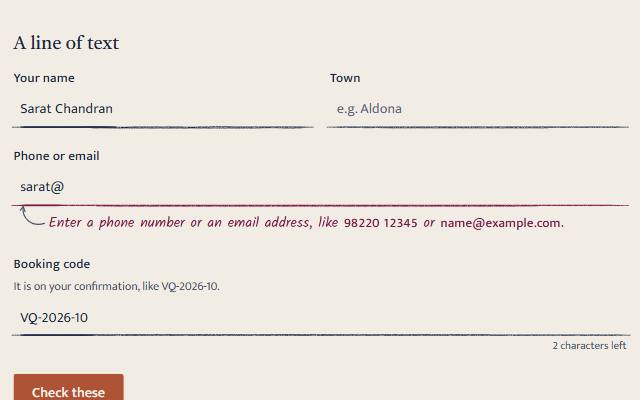
A label over a ruled line, for a line of text or a longer message, wrapping a native input or textarea that types, autofills, validates and submits without JavaScript.
quiet warm playful
Open the live demo
npx susegad add field
Stands on: Core, Core: components, Engine, Tokens
The prompt
the prompt
A label over a ruled line, for a line of text or a longer message. In warm, the line is drawn in pencil on the page and inks as you use it.
It is a native <label> and <input> or <textarea> underneath, so it types, autofills, validates and submits without JavaScript.
<link rel="stylesheet" href="susegad/components/field/field.css">
<script type="module" src="susegad/components/field/field.js"></script>

<sg-field>
  <label for="name">Your name</label>
  <input id="name" name="name" required autocomplete="name">
</sg-field>

<sg-field>
  <label for="msg">Anything else</label>
  <textarea id="msg" name="message" rows="4"></textarea>
</sg-field>| Put inside | What it does |
|---|---|
<label> | The field's name. Linked to the control; a label without for is linked for you. |
<input> or <textarea> | The control, with every native attribute (required, type, maxlength, autocomplete…). |
<sg-field-note> | The note that says what is wrong (see the field note). |
The prompt
Make a text field web component that wraps a native label and an input or textarea: <sg-field><label for="name">Your name</label><input id="prompt-name" required></sg-field>. The native control does everything (typing, autofill, validation, submitting); JavaScript only adds to it. Without JavaScript, style the field as a line in a notebook: the label above, a faint writing strip, and a hairline rule under the words that meets 3:1 against the page. Rule a textarea like a notebook page, with rules that scroll with the words. Link a label that lacks for. Near a maxlength, show how many characters are left, and say it aloud only at 20, 10 and 0, not at every key. Give it three registers. Quiet: exactly the ruled line, nothing drawn and nothing moving. Warm: write on the paper itself, with no well. Draw the resting rule in pencil, in the text ink: a seeded line that wanders a little, lighter where the pencil lands and lifts, run a few pixels past both ends of the field, with a lighter second pass over part of it and paper grain through the graphite. It must still meet 3:1. Give a textarea an exercise-book margin, one laterite line down the page, and move the words clear of it. When the field has focus, ink the whole rule from left to right over the register's slow duration, so the focused field is the one living thing on the page; under reduced motion the ink is simply there. As you type, ink the rule under your words, exactly as far as they go, as a pen line whose width swells and thins and whose path strays slightly off the rule, from smooth noise seeded by the field's name. For a textarea, ink every ruled line as far as its words go, measured in a hidden copy of the textarea. Keep the start of the line still as it grows. Playful: the same drawing in accent ink with a thicker nib and no grain, on the writing well, with a double margin down a textarea, and heavier ink under the words that wobbles on twos while you type, re-rolled twelve times a second, and settles the moment you stop. The ink changes only when the words do, never under reduced motion, and never covers the words.
Words to code
| When you say | Technique | What happens |
|---|---|---|
| wraps a native label and an input | native first | The element only reads its input or textarea (static native). Every behaviour a person relies on is the browser's own, so a page without JavaScript loses nothing but the ink. |
| a line in a notebook … 3:1 | CSS | border-block-end in --sg-rule-strong (3:1 on every surface) over a faint --sg-surface-sunk strip. A textarea draws its rules with a repeating gradient 1.75rem apart and background-attachment: local, so they scroll with the words. |
| say it aloud only at 20, 10 and 0 | live regions | The visible count is aria-hidden. A separate polite region changes only at those three steps. countState() decides when the count shows (the last fifth, or the last 10 for short limits). Unit-tested. |
| exactly as far as they go | measurement | A line is measured with canvas.measureText in the control's own computed font, minus its scroll. A textarea's words are laid out in a hidden mirror with the same box, and Range.getClientRects() gives one rect per line; lineRuns() merges them into runs. |
| draw the resting rule in pencil | pencil rule | pencilRule() returns two inkPath() passes: the first from a seeded 1.5 to 4 units before the field to 2 to 5.5 past it, with long tapers (22 and 30 units) so it is lighter where it lands and lifts; the second thinner, at 60% opacity, over a seeded stretch inside. The CSS rule turns transparent but keeps its width, so nothing shifts. |
| paper grain through the graphite | SVG filter | An feTurbulence alpha mask, composited in the pencil group, breaks up the graphite, drawn in --sg-text. Painted once per size; warm only. Measured at 1x along the rule: 6.1:1 median and 4.5:1 at the 10th percentile in light, 8.4:1 and 6.5:1 in dark. GRAIN is exported for select and combobox. |
| an exercise-book margin | pencil rule, turned | A pencilRule() pass the height of the textarea, rotated 90 degrees, 20 units in, in --sg-laterite; two, 3.5 apart, in playful. The textarea's inline padding grows to 2rem so the words start past it. |
| ink the whole rule from left to right | Web Animations | A full-width inkPath() on the rule, revealed with clip-path: inset(0 100% 0 0) to inset(0) over 560 ms in warm and 420 ms in playful (inkIn()); none in quiet or under reduced motion. The finished animation is cancelled so the count stays low. |
| a pen line whose width swells and thins | ink | inkPath() builds a filled outline from points every 6 units: the drift comes from seeded Perlin noise (the engine's makeNoise), the half-width from a second noise band, and the ends taper as the nib lands (5 units) and lifts (12). |
| keep the start of the line still as it grows | seed | The noise is sampled at fixed x positions, not spread over the length, so typing more never reshapes what is already inked. A test checks the first 40 units are identical at 60 and 200 units. |
| wobbles on twos … settles the moment you stop | boil | boilPhase() steps the noise twelve times a second while the last keystroke is under 600 ms old. After that it draws once with phase 0 and the frame loop stops. |
| never covers the words | layering | For a line, the ink's SVG is only as tall as the band along the rule (13 units), and exactly as wide as the control: the pencil's overrun past each end is ink overflow (overflow: visible), drawn without widening the page, so it sits below the text; the words' ink sits on the rule itself. It is aria-hidden and ignores the pointer. |
<sg-field> is a label over a ruled line, for a line of text (<input>) or a longer message (<textarea>). The native control does all the work; the element adds the ink and a character count.
Use
<link rel="stylesheet" href="susegad/components/field/field.css">
<script type="module" src="susegad/components/field/field.js"></script>

<sg-field>
  <label for="name">Your name</label>
  <input id="name" name="name" required autocomplete="name">
  <sg-field-note for="name" validate></sg-field-note>
</sg-field>

<sg-field>
  <label for="code">Booking code</label>
  <input id="code" name="code" maxlength="12">
</sg-field>

<sg-field>
  <label for="msg">Anything else</label>
  <textarea id="msg" name="message" rows="4"></textarea>
</sg-field>
Hints go between the label and the control, linked with aria-describedby:
<sg-field>
  <label for="phone">Phone</label>
  <p class="hint" id="phone-hint">We only call about this booking.</p>
  <input id="phone" name="phone" aria-describedby="phone-hint">
</sg-field>
Without JavaScript
field.css styles the native label and control directly, so a page without JavaScript shows the same ruled line and the form submits as usual. Link a <label for> to its control yourself for that path; the element links a label without for only when it runs.
Attributes
<sg-field> itself takes only register. Everything else belongs on the control: required, type, maxlength, pattern, autocomplete, inputmode.
| Set by the element | When |
|---|---|
data-filled | the control has text |
data-kind | line or area |
data-skin | the mounted skin's register |
Registers
| Look | Motion | |
|---|---|---|
| quiet | a hairline rule under a faint writing strip; a textarea ruled like a notebook | none |
| warm | written on the paper itself: no well, a pencil rule drawn by hand and a little past both ends, inked over as far as your words go; a textarea gets a laterite margin like an exercise book | the focused field's rule inks from left to right over 560 ms, the one thing on the page that moves; the words' ink changes only when the words do |
| playful | the same drawing in accent ink with a thicker nib, on the writing well, with a double margin down a textarea; the ink wobbles twelve times a second while you type | the focus ink runs in over 420 ms; the wobble settles 0.6 s after you stop; none under reduced motion |
Accessibility
- It is a native label and control, so keyboard, screen readers, autofill and validation behave exactly as they do without the element.
- An error (
aria-invalid="true", set by the field note) thickens the rule and turns it, and the ink, to the danger colour. The note says what is wrong in words. - The rule meets 3:1 against the page (
--sg-rule-strong); focus shows the library's focus ring. The drawn rules are stronger: measured at 1x in the demo, the warm pencil (text ink under paper grain) is about 6:1 in light and 8:1 in dark along most of its length, and 4.5:1 at its weakest tenth; the playful ink about 5:1 in both. - Under reduced motion the focus ink is simply there, with no draw-in. In forced colours the drawing goes and the system's own rule comes back.
- With a
maxlength, the count appears in the last fifth (or the last 10 characters). It is read aloud only at 20, 10 and 0 left. - The ink is
aria-hidden, ignores the pointer, and never covers the words.
Checks
node --test packages/components/field/field.test.js covers the ink geometry, the pencil rule, the focus timing, the boil, line reading and the count. node packages/components/field/field.check.mjs checks keyboard use, the pencil rule at rest, the margin, the focus ink, the ink's length, the count, the textarea, reset, the playful wobble (and its absence under reduced motion) and the page without JavaScript in Chromium.