The first rain (storybook spread)
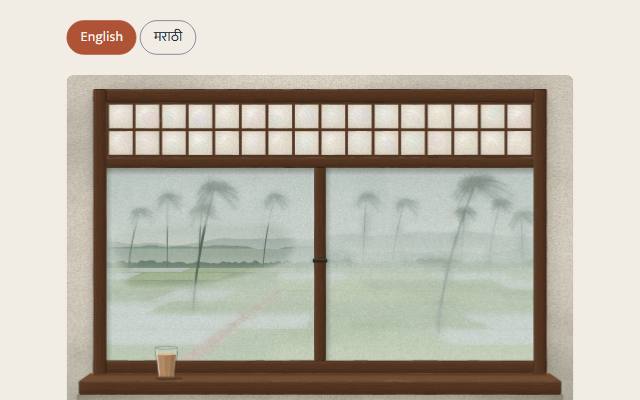
One bilingual (English and Marathi), narrated spread of a Goan children's storybook: text beside the paus scene, word-by-word highlighting, always-present captions, and rain intensity driven by which words are playing, not the clock.
quiet warm playful
Open the live demo
npx susegad add storybook-spread
Stands on: Core, Core: components, Engine, Narration, Player, Paus, Tokens
The prompt
the prompt
Text beside a scene, bilingual, narrated, the current word marked as it plays.
The prompt
Build one spread of a children's storybook: a scene the story lives inside (<sg-scene name="paus">, the register warm), the story's text in two languages with a switch between them, and each language's own narration, played from a plain <audio controls> with a native <track kind="captions"> so captions and playback both work without any JavaScript, wrapped in a polished player once JavaScript runs. Wrap the visible text's words in spans once the page mounts, so a highlight driver has something to mark without the static markup ever looking like anything but plain paragraphs. Wire the narration's per-phrase event to the scene's params, using the same beat order the story script already gives both languages, so the window's rain answers what the words just said regardless of which language is playing, and never drifts out of sync when a reader pauses or replays. When a played-back media element and a separate word-highlight driver can both draw captions from the same track, pick one as the page's real captions and say why, rather than showing the same sentence twice with nothing between them. Say plainly, in both languages, that a screen without JavaScript still holds the whole story in words. Where no audio can be reached, fall back to the browser's own voice or, failing that, the text and captions already on the page.
Words to code
| When you say | Technique | What happens |
|---|---|---|
| a highlight driver has something to mark without the static markup ever looking like anything but plain paragraphs | progressive enhancement | wrapWords(el) runs at mount time, splitting each paragraph's text nodes into [data-word] spans while leaving the HTML source as plain sentences. |
each language's own narration, played from a plain <audio controls> … wrapped in a polished player once JavaScript runs | progressive enhancement, not a replacement | <sg-player> wraps the native <audio>; without JavaScript the browser's own controls and captions are the whole experience; with it, a drawn bar takes over, the native element still underneath. |
| the window's rain answers what the words just said … never drifts out of sync | beat-driven, not clock-driven | sg-narration fires sg-phrase with the phrase's index; mountStorybookSpread looks that index up in story/spread.json's scene_cues.cues and calls scene.set(cue.params) — driven by which words are playing, never by elapsed time. |
| regardless of which language is playing | one cue list, one beat order | Both languages' phrase arrays share the same beat order and count, so one cues array, indexed by position, drives the scene under either. |
| pick one as the page's real captions and say why | one source of truth | <sg-player>'s own caption line and <sg-narration>'s word-highlighted paragraph both read the same <track>; recipe.css hides .sg-player__captions (the paragraph is always-visible page content, not an optional overlay, and the box is built for a video frame this audio player doesn't have) and says why in a comment at the top of recipe.js. |
| fall back to the browser's own voice … the text and captions already on the page | graceful degradation | An <audio> error event calls speakFallback() from packages/narration; if that itself can't run, the paragraphs and native captions are already there. |
Accessibility
- Every state the scene or the highlight shows is also plain text: the story paragraphs, always visible; the captions, always present; the language names, spoken as words on the switch buttons.
- The language switch is
<button aria-pressed>, not a custom widget, so it needs no extra ARIA wiring. - Nothing autoplays. The player's own play press is the consent (decision 0015); it is the same press whether
<sg-player>has enhanced the control or not.
Credit
The story itself — "The first rain" — and its Marathi retelling are Kathakar's, in story/spread.md and story/spread.json, with open questions for a native speaker and for the owner flagged there. This recipe is the scaffolding around it, not the words.
One spread of a Goan children's storybook, "Paus" — a Goan child, home, the first afternoon the monsoon actually arrives — bilingual (English and Marathi), narrated, with word-by-word highlighting and captions. Built as Wave 7's opening proof of concept; the whole book comes later. The Marathi text and the speaker choice are drafts, not yet reviewed by a native speaker: see story/spread.md.
It composes:
| Piece | Used for |
|---|---|
<sg-scene name="paus"> | the window, rain intensity driven by the narration's beats, not the clock |
<sg-narration> (packages/narration/) | drives word-by-word highlighting on the story paragraph, from the same <track> |
<sg-player> (packages/player/) | the play bar: play, time, a scrubber, mute, and its own CC button (see "Captions" below for what it toggles here) |
wrapWords() (recipe.js) | wraps a paragraph's words in [data-word] spans for the highlight driver, at mount time, so the static markup stays plain text |
Files
| File | What it is |
|---|---|
index.html | The page: a language switch, the scene, and one region per language, each with its own <sg-player> wrapping an <audio>, <track kind="captions"> and story text. |
recipe.js | wrapWords(el) and mountStorybookSpread(root, { cues, defaultLang }). Importing it registers <sg-scene>, <sg-narration> and <sg-player>; it wires nothing else until you call mountStorybookSpread. |
demo.js | The demo page's wiring: fetches story/spread.json for its scene cues and calls mountStorybookSpread. Your own page passes its own cues (see below) instead of fetching story/ directly, since a builder's project won't have that folder. |
recipe.css | Layout: the toolbar, the scene, the two language regions. |
spread.en.wav, spread.en.vtt, spread.mr.wav, spread.mr.vtt | The built narration: one audio track and one WebVTT file per language, built by build.mjs from story/spread.json through packages/narration's fixture cache. |
build.mjs | Builds the four files above. node packages/recipes/storybook-spread/build.mjs [--provider stub|sarvam]. Every call goes through the cache; with no SARVAM_API_KEY it falls back to the stub and says so. |
story/ | Kathakar's: the readable spread (spread.md, with the native-reviewer and owner questions) and the machine-readable script (spread.json: phrases, pace, pauses, the speaker choice, scene cues, interface copy). Read here, never edited here. |
How the scene is driven
story/spread.json's scene_cues.cues is one array of { beat, params }, shared by both languages because their phrase arrays have the same beat order. <sg-narration> fires sg-phrase ({ index, start, end }) once per phrase as the audio plays; mountStorybookSpread looks up cues[index] and calls scene.set(cue.params). This means the window's rain intensity always matches what the words just said, in either language, and pausing or replaying the narration never desyncs it — it is driven by the beat, not by wall-clock time or percent-through-the-audio.
params.progress is a different idea (it clears the fog from the sill up to show a task's completion, never moved by time) and is not used here; only params.intensity.
Captions: one source of truth
Both <sg-player> and <sg-narration> can read the same <track kind="captions">: the player draws its own caption line (the current phrase, meant to sit over a video's frame), and the narration driver highlights the current word in the story paragraph beside it. Showing both at once says the same sentence twice, with nothing to look at between them — and <sg-player>'s caption box is built for a video's frame, which an audio player doesn't have, so it would float with no picture behind it regardless.
The story paragraph is the one source of truth here: it's the page's actual content (not aria-hidden), it's always visible (not an optional overlay), and its word-by-word highlight already satisfies "captions always present." recipe.css hides .sg-player__captions for this page only (not in packages/player/, where the default is right for video). The <track> element and <sg-player>'s CC button both keep working underneath; the toolbar's old separate captions toggle was removed as redundant, since there's nothing honest for an on/off switch to do when the real captions can't be turned off.
Building the narration
node packages/recipes/storybook-spread/build.mjs                    # from the cache, stub on any miss
node packages/recipes/storybook-spread/build.mjs --provider sarvam  # sarvam on a miss, if SARVAM_API_KEY is set
The fixture cache (packages/narration/fixtures/) means a repeat build costs nothing; only a genuinely new phrase, voice, model or pace triggers a network call. The Wave 4 build synthesised both languages once, real Sarvam audio, bulbul:v3, speaker shubh (per spread.json's speakers), 37.9s English and 48.3s Marathi — see docs/briefs/progress/karigar-narration.md for the full call log and the small model-name test that preceded it.
Without JavaScript
Both languages' story text is always visible as plain paragraphs. Each <audio controls preload="metadata"> with its <track kind="captions"> plays and captions with no JavaScript at all — the browser's own controls, the browser's own caption rendering. preload="metadata" loads only the header (so the control shows the real duration instead of "0:00 / 0:00"), never the audio itself; nothing plays before the control is pressed. Only the scene, the word-by-word highlight, and the language/captions toggles are JavaScript-enhanced; a <noscript> note says so in both languages.
Use it on your own page
import { mountStorybookSpread } from './recipe.js';
import spread from './story/spread.json' with { type: 'json' }; // or your own copy of the cues

mountStorybookSpread(document.getElementById('spread'), {
  cues: spread.scene_cues.cues,
  defaultLang: 'en',
});