Signature
Sign by hand or by typing your name. The native path is a typed-name input that submits and works without JavaScript; with it, a pad takes a finger, pen or mouse, inks the stroke from the pen's pressure and speed, and submits the ink as SVG path data in a hidden input. Undo and start again are real buttons.
quiet warm playful
Open the live demo
npx susegad add signature
Stands on: Core, Core: components, Engine, Tokens
The prompt
the prompt
The signature on a form, a lease or a delivery slip: a name in your own hand, or typed when a hand isn't possible.
A place to sign a form. Draw with a finger, a pen or the mouse, or type your name. The ink behaves like ink, and what the form sends is exactly what you see.
<link rel="stylesheet" href="susegad/components/signature/signature.css">
<script type="module" src="susegad/components/signature/signature.js"></script>

<sg-signature>
  <label for="sig">Type your full name to sign</label>
  <input id="sig" name="signature" autocomplete="name" required>
</sg-signature>
The prompt
Make a web component for signing a form. Start from a label and a typed-name input that submits with the form and works without JavaScript; set the name in a handwriting face on a signing line. With JavaScript, add a pad above it to sign on with a finger, pen or mouse, plus "Undo last stroke" and "Start again" buttons and a line of help linked to the input. Record each stroke as pointer samples with time and pressure, using coalesced events so fast strokes stay smooth. Turn each stroke into a filled ribbon of ink: widen it with a pen's pressure (ignore the mouse's fixed 0.5), thin it when the stroke is quick, swell it in at the start, flick it thin when the pen lifts quickly and leave it blunt when it lifts slowly, and round both ends. Export the ribbons as SVG path data into a hidden input, so the server receives exactly the ink on screen. Either a drawing or a typed name satisfies required, through the input's custom validity, so native validation still works. Give it three registers. Quiet: a plain hairline line and a plain pen that is the same width in every direction. Warm: a pencilled line with a small cross, and a broad nib held at 35 degrees so downstrokes come out thick and joins hairline; fresh ink is glossy and dark, then dries into the paper's grain over a second and a half. Playful: the warm ink in the accent colour, and once the pen rests, a swash that underlines the signature and ends in a small loop, never submitted. Bake dry strokes into a cached layer and repaint only the fresh ink while it dries. The pad is hidden from assistive technology, so say "Signed by drawing" and "Signature cleared" in a polite status line, and keep the typed name as the keyboard way to sign. With reduced motion, lay the ink down dry.
Words to code
| When you say | Technique | What happens |
|---|---|---|
| a typed-name input that submits … without JavaScript | native first | The builder's <input> is the control. The element only adds things around it, and required stays native: with JavaScript the element clears required and sets the input's custom validity instead, so a drawing can count too. |
| record each stroke as pointer samples | pointer | Pointer capture on the canvas, and getCoalescedEvents() for every sample the screen saw between frames. Each sample is [x, y, time, pressure] in the pad's 600 × 200 units, via the engine's stage().toLogical. |
| widen it with a pen's pressure (ignore the mouse's fixed 0.5) | physics | strokeWidths uses pressure only when pointerType is pen. Speed is smoothed and always counts: width = base × (0.45 + 1.1p) × (0.5 + 0.75 / (1 + 1.6v)), then eased so the width never jumps. |
| swell it in … flick it thin … blunt | easing | Along the stroke's length the width rises over the first 7 units. If the lift speed is over 0.9 units per ms, it falls to a quarter over the last 16. |
| a filled ribbon of ink … round both ends | geometry | ribbon runs a Catmull-Rom spline through the samples, carrying width as a third coordinate, offsets each point along its normal by half the width, and joins the two sides with half-circle caps. It is the engine's ink() idea, driven by the hand instead of by noise. A tap is a dot. |
| a broad nib held at 35 degrees | physics | The width is multiplied by 1 − nib + nib × |sin(angle − 35°)|. Strokes along the nib's edge come out hairline, strokes across it full. |
| exactly the ink on screen | what you see is what is sent | The same polygons are painted and written into signature-path with one decimal. A register change re-inks the strokes and rewrites the path. |
| dries into the paper's grain | texture | Fresh ink is filled solid with a pale sheen along its edge. As it dries, the engine's grain pattern is cut out of it with destination-out more and more, and when it is dry it is baked into a cached layer and never painted again. |
| a swash that underlines the signature and ends in a small loop | seed | flourish(bounds, seed) makes samples along a dipping, rising curve that turns back into a loop, inked with the same ribbon and drawn in over 650 ms. |
| hidden from assistive technology … a polite status line | accessibility | The pad is aria-hidden. role="status" says when a drawing starts and when it is cleared, not on every stroke. |
Accessibility
- The typed name is a complete way to sign, by keyboard, switch or screen reader. It has its label and the help text.
- The drawing's state is said in words. Undo and Start again are buttons, disabled when there is nothing to take away. Focus never drops to the page.
- Contrast: the ink is
--sg-ink(or--sg-accent-textin playful) on--sg-surface-raised. The buttons and help use token text colours. - Reduced motion lays the ink down dry.
Credit
Grown from the Susegad engine's ink(), the hand-inked ribbon every plate draws with, and from broad-nib dip pens and fountain pens, whose thick downstrokes and hairline joins are what a written signature looks like. Tier: pan-Indian.
<sg-signature> lets someone sign by hand or by typing their name. It enhances a typed-name <input>, which is the whole control without JavaScript and the keyboard way to sign with it.
Use
<link rel="stylesheet" href="susegad/components/signature/signature.css">
<script type="module" src="susegad/components/signature/signature.js"></script>

<form method="post" action="/sign">
  <sg-signature>
    <label for="sig">Type your full name to sign</label>
    <input id="sig" name="signature" autocomplete="name" required>
  </sg-signature>
  <button>Sign and send</button>
</form>
The form receives two fields:
| Field | Holds |
|---|---|
signature | the typed name, which may be empty if they drew |
signature-path | the drawn ink as SVG path data in a 600 × 200 box, or empty if they typed. Only sent when JavaScript ran. |
To show a drawn signature again, put the path in an SVG:
<svg viewBox="0 0 600 200"><path fill="currentColor" d="…the signature-path value…"/></svg>element.toSVG('#1d2742') returns the same as a standalone string.
What people see and do
- Without JavaScript: the label and a typed-name input on a signing line, set in the hand face.
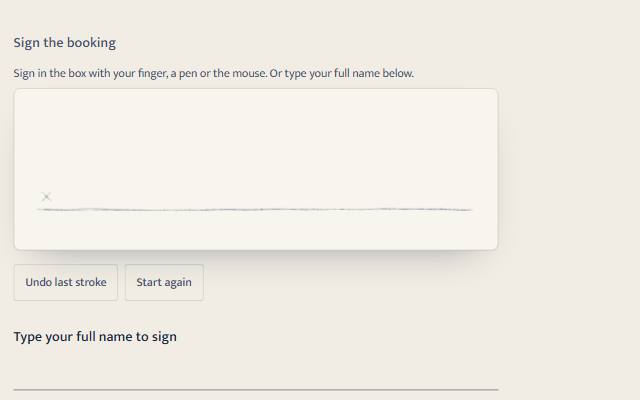
requiredworks natively. - With JavaScript: a line of help ("Sign in the box with your finger, a pen or the mouse. Or type your full name below."), the pad, Undo last stroke and Start again buttons, then the same label and input.
- Drawing or typing a name both count as signed. If they draw, the pad shows the drawing; if they only type, the pad shows the name in the hand face.
- Start again clears the drawing and the name, and puts focus in the name. A form reset clears the drawing too.
Attributes
| Attribute | Values | Default |
|---|---|---|
path-name | the hidden input's name | <input name>-path |
seed | any string: fixes the playful flourish | signature |
data-value-missing | your wording when nothing is signed and the field is required | "Sign in the box, or type your full name." |
register | quiet, warm, playful | inherited |
Put required, disabled and autocomplete on the input as usual. With JavaScript, required stays on the input (so screen readers announce it) until there is a drawing, which signs instead; the element then lifts it, and puts it back if the drawing is undone or cleared. While nothing is signed it also sets the input's custom validity to its own words, so native validation, :invalid and <sg-field-note validate> all still work.
Properties, methods and events
method(read only):'drawn','typed'ornull.pathData(read only): the SVG path data being submitted.strokes: the raw samples,[[x, y, timeMs, pressure], …]per stroke, in pad units. Set it to restore a signature.undo(),clear(),toSVG(color).sg-signatureevent, bubbling,detail: { method, strokes }, on every change.- Drawing also fires
inputon the typed-name field, so validation helpers re-check.
Registers
| Pad | Ink | Motion | |
|---|---|---|---|
| quiet | a plain hairline signing line | a plain pen: width from speed (and a pen's pressure), the same in every direction | none beyond the pen itself |
| warm | a pencilled line with a small cross | a broad nib at 35 degrees: thick downstrokes, hairline joins; fresh ink is glossy and dark and dries into the paper's grain over 1.6 s | the drying |
| playful | as warm, ink in the accent colour | as warm | once the pen rests, a swash underlines the signature and ends in a loop |
Reduced motion lays the ink down dry and shows the flourish without drawing it. What is submitted is always the ink as shown. The flourish is decoration and is never submitted.
Accessibility
- The typed name is the keyboard and screen-reader way to sign, and a full signature on its own. The help text is linked to it with
aria-describedby. - The pad is
aria-hidden: a drawing can't be read aloud, so its state is said in words in a polite status line ("Signed by drawing. You can undo or start again.", "Signature cleared."). - Undo and Start again are real
<button type="button">s and never submit. When Undo removes the last stroke and disables itself, focus moves to the name instead of dropping to the page. - A disabled input disables the pad and both buttons.
- The pad stops page scrolling only while a finger is on it (
touch-action: noneon the canvas).
Budget and performance
| File | Bytes |
|---|---|
signature.js + signature.core.js (behaviour) | 14.3 KB of 15 KB declared |
skins/paint.js + skins/marks.js (shared painter) | 9.6 KB |
skins/quiet.js, warm.js, playful.js | 0.3 to 0.4 KB each |
Dry strokes are baked once into a cached layer. Only fresh ink is painted again each frame, and only while it dries, and never off screen. Measured at 16.7 ms mean and 16.8 ms worst while drawing three strokes and letting them dry, in every register and at 2× pixel density (headless Chromium, 4 × Intel N100, 86% busy). At rest the pad costs nothing: 0.78× the Paus baseline in the same run.