Connecting (FireflySync)
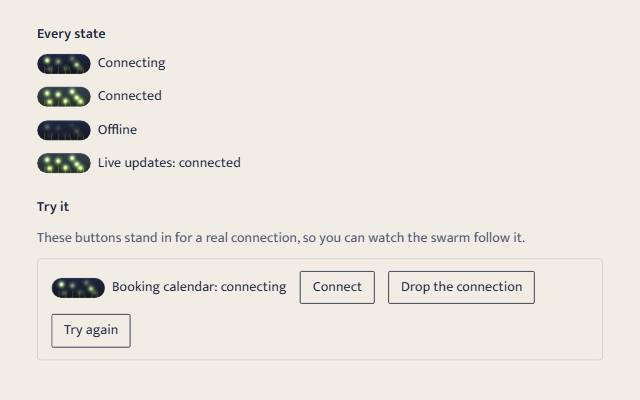
A connection's state in words, read out as it changes. Quiet shows a static dot; warm and playful show fireflies that blink on their own while connecting and fall into step (Kuramoto coupling) only once connected. Offline, they dim.
quiet warm playful
Open the live demo
npx susegad add connecting
Stands on: Core, Core: components, Engine, Tokens
The prompt
the prompt
Fireflies in a Goan field at dusk: each blinks on its own clock until, with nobody leading, they flash together.
A small status indicator for a live connection. The words say the state. In warm and playful, a slice of night beside them holds a few fireflies that blink at random while the connection is being made and fall into step once it is made.
<script type="module" src="susegad/components/connecting/connecting.js"></script>
<link rel="stylesheet" href="susegad/components/connecting/connecting.css">

<sg-connecting state="connecting" label="Live updates">
  <span role="status">Live updates: connecting</span>
</sg-connecting>

<script>
  socket.addEventListener('open', () => indicator.connection = 'connected');
  socket.addEventListener('close', () => indicator.connection = 'offline');
</script>
The prompt
Build a connection status indicator as a light-DOM custom element, <sg-connecting state="connecting|connected|offline">, that enhances a <span role="status"> holding the words, so the state is always in text, is read out politely when it changes, and still shows without JavaScript. Give it three registers. Quiet: the words and a static dot drawn in CSS from the state attribute, a ring while connecting, filled when connected, struck through when offline, and nothing moves. Warm: beside the words, a small pill of night sky with a line of grass and seven fireflies painted on a canvas. Model the fireflies as phase oscillators with Kuramoto coupling in a pure, seeded core that runs in Node: while connecting, make the coupling slightly repulsive so they blink out of step and never drift into agreement by chance; when the state becomes connected, switch to strong coupling so they fall into step within about three seconds and then flash together, with the whole pill brightening a little on each shared flash; when offline, slow and dim them. Sync on screen must only ever mean the connection is up. Playful: the same with fourteen fireflies, a wider meadow and brighter glows. With reduced motion, draw the finished still for the state: all lit together when connected, a scatter of bright and dim while connecting, dim when offline. Pause the animation when the indicator is off screen.
Words to code
| When you say | Technique | What happens |
|---|---|---|
enhances a <span role="status"> holding the words | native first | The status role makes the span a polite live region, so a screen reader hears "Connected" when it changes. The element only rewrites the words when they differ, so nothing is read out twice. |
| a still that does not speak | role="none" on the element | The words go in a plain span instead of a live region, so a gallery of states is quiet on load. |
| a ring while connecting, filled when connected, struck through when offline | shape, not only colour | Each state has its own dot shape, drawn by CSS from the attribute, so it reads for people who cannot tell the colours apart, and without any script at all. |
| phase oscillators with Kuramoto coupling | emergence | Each firefly has its own rhythm near one flash every two seconds and nudges its phase toward the swarm's average. With strong enough coupling, synchrony emerges on its own; nobody leads. |
| slightly repulsive so they blink out of step | motion that follows the work | Free-running fireflies would sometimes line up by chance and look connected. A small negative coupling pushes them apart instead, so the tests can show the order parameter stays under one half for a whole minute of connecting. |
| fall into step within about three seconds | state | Positive coupling is switched on only by the connected state. Across four hundred seeded swarms the slowest reaches an order of 0.95 in 2.7 seconds. The words change at once; the picture follows them, never leads. |
| the whole pill brightening a little on each shared flash | colour | When connected, the pill is washed with a faint green light scaled by how in step the swarm is and how bright it is right now, so the shared flash reads as one pulse. |
| a pure, seeded core that runs in Node | determinism | The swarm steps in fixed sixtieths of a second whatever the frame rate, so the same seed and the same sequence of states always give the same fireflies. |
| the finished still for the state | reduced motion | No loop runs. The still is chosen to say the state at a glance: together, scattered or dim. |
<sg-connecting> shows whether a live connection is up: a websocket, a sync, a booking calendar that updates itself. The words always say the state. In warm and playful, fireflies beside the words blink on their own while connecting and fall into step once connected.
Usage
<link rel="stylesheet" href="susegad/components/connecting/connecting.css">
<script type="module" src="susegad/components/connecting/connecting.js"></script>

<sg-connecting state="connecting" label="Live updates">
  <span role="status">Live updates: connecting</span>
</sg-connecting>
Set the state from your connection code:
const indicator = document.querySelector('sg-connecting');
socket.addEventListener('open', () => { indicator.connection = 'connected'; });
socket.addEventListener('close', () => { indicator.connection = 'offline'; });
A server can swap the attribute instead (state="connected"); the element follows with no other code.
Attributes and properties
| Attribute | Property | Values | What it does |
|---|---|---|---|
state | connection | connecting (default), connected, offline | The connection's state. Anything else reads as connecting. |
label | text | Names what is connecting. With label="Live updates" the words become "Live updates: connected". | |
seed | any number or word | Gives this indicator its own arrangement of fireflies. Without it, every indicator on the page matches. | |
register | quiet, warm, playful | Overrides the page's register for this element. | |
role="none" | For a still that should not speak, such as a gallery of states: the words still show, in a plain span, but they are not a live region. |
Registers
- Quiet: the words and a static dot. A ring while connecting, filled in the success colour when connected, struck through in the danger colour when offline. Nothing moves; the dot changes in 140 ms. This is also what shows without JavaScript.
- Warm: a 64 by 24 pixel slice of night with seven fireflies. They blink out of step while connecting, fall into step within about three seconds of connecting, and flash together after that. Offline, they slow and dim.
- Playful: the same, 108 by 30 pixels, with fourteen brighter fireflies.
What moves, and why
The fireflies are only ever in step when the state is connected. While connecting or offline the model pushes them apart, so they cannot line up by chance. The words change the moment the state does; the picture follows within three seconds. The component does not retry or time anything itself: it shows what your code tells it.
Accessibility
- The words live in a
<span role="status">, a polite live region. Screen readers announce each change once, and never the state the page loads in: the first words are written witharia-live="off", which the next change lifts. If you leave the span out, the element adds one. - With
role="none"on the element, the words are shown but never announced. Use it for pictures of a state, never for the one indicator that tracks a real connection. - The dot and the fireflies are decorative (
aria-hidden). Each state has its own dot shape, so colour is never the only difference. - Nothing is focusable and nothing needs a keyboard.
- With reduced motion, warm and playful show a still: all lit together when connected, a scatter of bright and dim while connecting, dim when offline.
Performance
The night and grass are painted once and cached; each frame stamps one glow sprite per firefly. The animation stops when the indicator is off screen or the tab is hidden, and the swarm steps at a fixed 60 Hz whatever the frame rate.