Voice note
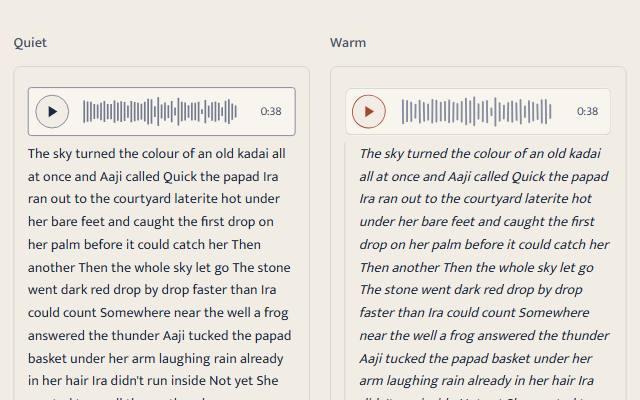
A voice message the way a phone shows it: a play button, a waveform you can seek along, the length, and the transcript always on show. It enhances a native audio element and plays only when its own button is pressed. The waveform comes from real loudness measured at build time, or is a seeded stand-in marked as one.
quiet warm playful
Open the live demo
npx susegad add voice-note
Stands on: Core, Core: components, Engine, Narration, Player, Tokens
The prompt
the prompt
A voice message the way it shows up on a phone: a guest's spoken review, a founder's thank-you, a tour guide's note from the fort.
The words matter more than the sound, so the transcript is always on show. The sound plays only when someone presses play.
<link rel="stylesheet" href="susegad/components/voice-note/voice-note.css">
<script type="module" src="susegad/components/voice-note/voice-note.js"></script>

<sg-voice-note peaks="0.12 0.64 0.9 0.41 …" label="from Maya">
  <audio controls preload="metadata" src="maya.m4a">
    <track kind="captions" src="maya.vtt" srclang="en" default>
  </audio>
  <p class="sg-voice-transcript">The children wore the new kurtas all weekend.</p>
</sg-voice-note>
The prompt
Make a web component that turns a native <audio controls> into a voice message like a phone's: a round play button, a waveform, and the length. Keep the transcript beside it visible at all times; without JavaScript the browser's own controls and the transcript are the whole thing. Never play until the play button is pressed, and remove any autoplay. Use a real <button> whose name says Play or Pause, and lay a native range input, invisible, over the waveform so arrows and screen readers seek, with the time in words as its value text. Draw the waveform from loudness measured once at build time from the audio file (root mean square per slice, not the single loudest sample, which is flat for speech), passed in a peaks attribute; when there are no peaks, draw a seeded stand-in and mark the element so it's clear it's a drawing. Fill the bars as the audio plays, and only then. If the transcript's phrases carry start and end times, mark the phrase being spoken. Give it three registers. Quiet: a hairline row with thin square bars. Warm: pencil bars whose ends wander a little, an inked ring around the play button, the transcript as an italic note. Playful: a bright pill with round bars, and the button springs when pressed, never under reduced motion.
Words to code
| When you say | Technique | What happens |
|---|---|---|
| turns a native audio into | progressive enhancement | The element removes controls and adds its own bar after the audio; disconnected() puts them back. |
| never play until pressed | consent (decision 0015) | Only the button's click calls play(). autoplay is removed with a warning. The check wraps HTMLMediaElement.prototype.play and counts zero calls before the press. |
| an invisible native range over the waveform | native first | <input type="range" max="1000"> fills the wave's box at opacity 0, with aria-valuetext "0:12 of 0:42" from timeText(); the wave draws the focus ring with :has(input:focus-visible). |
| loudness measured once at build time | a Node tool | peaks.mjs reads a WAV header with narration's parseWav() and prints RMS per slice, scaled to the loudest. barsFrom() fits them to the bars that fit the width, keeping each slice's loudest. |
| a seeded stand-in … marked | honesty | standInPeaks(seed) from seeded noise; the element sets data-waveform="stand-in" (or "measured"). |
| fill the bars as the audio plays | honest motion | The skin re-marks bars on timeupdate from scrubberFraction() (the player's). Nothing loops. |
| mark the phrase being spoken | cues | transcriptHtml(vtt) builds one span per cue with narration's parseVtt(); activeCue() (the player's) picks the current one. |
| the button springs | Web Animations | press(motion) returns a scale keyframe set at full motion only. |
Accessibility
- A real button (40 px) with a name that says what it will do; a native range for seeking.
- The visible time is
aria-hiddenbecause the range's value text says the same. - The transcript is plain text in the page, with and without JavaScript.
- Forced colours: the bars use GrayText and Highlight.
<sg-voice-note> shows a voice message with a play button, a waveform, the length and the transcript. It enhances a native <audio>.
Use
<sg-voice-note peaks="…" label="from Maya">
  <audio controls preload="metadata" src="maya.m4a">
    <track kind="captions" src="maya.vtt" srclang="en" default>
  </audio>
  <p class="sg-voice-transcript">…</p>
</sg-voice-note>
Use preload="metadata" so the length shows before anyone presses play; preload="none" shows 0:00.
It can sit inside a <sg-chat-thread> message, in place of .sg-chat-text.
At build time
ffmpeg -i maya.opus -ac 1 -ar 16000 maya.wav      # peaks.mjs reads 8- or 16-bit PCM WAV
node susegad/components/voice-note/peaks.mjs maya.wav 96
Paste the output into peaks. In an Astro page:
import { readFileSync } from 'node:fs';
import { peaksFromWav } from '../susegad/components/voice-note/peaks.mjs';
import { transcriptHtml } from '../susegad/components/voice-note/voice-note.core.js';
const peaks = peaksFromWav(readFileSync('maya.wav')).join(' ');
const transcript = transcriptHtml(readFileSync('maya.vtt', 'utf8')); // spans with cue times
A hand-written transcript works too; it just can't mark the phrase being spoken.
Attributes and events
peaks | loudness per slice, 0 to 1, spaces or commas; at least four values. Without it the waveform is a seeded stand-in and data-waveform="stand-in". |
label | added to the button's name: "Play voice message, from Maya" |
register | quiet, warm, playful |
sg-voice-play, sg-voice-pause | from the audio's own events |
sg-voice-press | the button was pressed; detail.playing |
Registers
| Look | Motion | |
|---|---|---|
| quiet | hairline row, thin square bars | the bars fill as it plays |
| warm | pencil bars, inked play ring, italic transcript | the same |
| playful | bright pill, round bars, accent play button | the same, and the button springs when pressed |
Reused
packages/player/player.core.js:formatTime,scrubberFraction,timeFromFraction,activeCue.packages/narration/vtt.js:parseVtt, fortranscriptHtml().packages/narration/wav.js:parseWav, forpeaks.mjs.
Accessibility
- Plays only on its own press;
autoplayis removed. - Keyboard: Tab to the button (Space or Enter plays and pauses), Tab to the waveform (arrows, Home and End seek).
- The transcript is always shown. For a note without one, the element warns in the console.
Notes
The dev server (tools/serve.mjs) now answers byte-range requests. Without them a browser can't seek audio and puts it back to 0:00; the keyboard check found this.