Stepper
A long form walked one step at a time. Without JavaScript every step is a visible fieldset with one submit. With it, Back and Next, focus on each step's legend, progress in words, and nothing typed ever lost.
quiet warm playful
Open the live demo
npx susegad add stepper
Stands on: Core, Core: components, Engine, Tokens
The prompt
the prompt
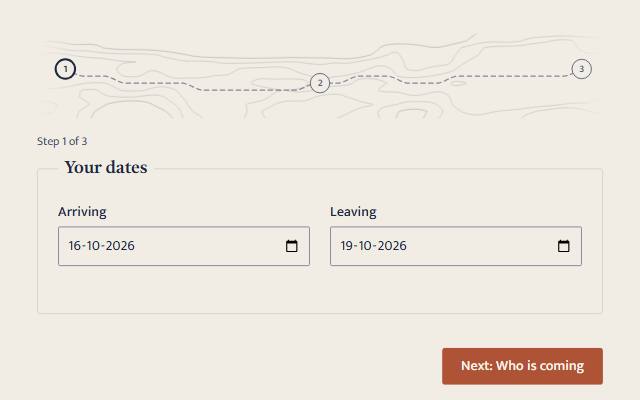
A long form as a walk: one station at a time, on a road drawn round the hills.
A long form, walked one step at a time. Without JavaScript every step is a visible fieldset, in order, with one submit button. With it, one step shows at a time with Back and Next. Nothing typed is ever lost, and the stations are drawn as a walk along a road.
<link rel="stylesheet" href="susegad/components/stepper/stepper.css">
<script type="module" src="susegad/components/stepper/stepper.js"></script>

<form action="/book" method="post">
  <sg-stepper>
    <fieldset><legend>Your dates</legend>…</fieldset>
    <fieldset><legend>Who is coming</legend>…</fieldset>
    <fieldset><legend>Your details</legend>…</fieldset>
    <button type="submit">Send the request</button>
  </sg-stepper>
</form>
The prompt
Build a multi-step form as a light-DOM custom element, <sg-stepper>, whose children are the form's own fieldsets, each with a legend, and one submit button, so that without JavaScript every step shows in order, numbered with CSS counters, and the form submits with native validation. With JavaScript, show one fieldset at a time by hiding the others, never removing them, so every value is kept and still submitted. Add a line that says "Step 2 of 3", Back, and "Next: <the next legend>", and move the form's own submit button beside Back on the last step. Next checks only the fields in the current step with their native validity and reports the first problem. Enter in a one-line field acts as Next. On submit, if the first invalid field is in a hidden step, go to that step first so the browser can point at it. On every change, move focus to the new step's legend and describe it by the progress line. Give it three registers. Quiet: numbered stations joined by a hairline, done steps filled, the current one heavier, nothing moving. Warm: a small survey map above the steps. Draw a seeded noise terrain as faint pencil contours that fade out at the edges. Put the stations in its valleys, alternating high and low. Find the road between them with A*, where climbing costs the square of the grade, so it bends round the hills. Draw the road as a dashed pencil guide, and ink each leg with a dash offset as you walk past it, lifting the ink if you step back. Playful: the same map in the accent colour, with footprints pressed in along the walked road. With reduced motion, draw the walk without animation.
Words to code
| When you say | Technique | What happens |
|---|---|---|
| the form's own fieldsets, each with a legend | progressive enhancement | The steps are ordinary HTML. Without JavaScript they all show and the one button submits them; CSS counters number them. |
| hiding the others, never removing them | keeping data | Hidden fieldsets keep their values and still submit, so going back, forward or off to another step loses nothing. |
| checks only the fields in the current step | native validation | Next reads each control's validity in the step and calls reportValidity() on the first problem, so the message is the browser's own. |
| if the first invalid field is in a hidden step, go to that step first | focus management | The browser cannot point at a field it cannot show. A click handler on submit finds the first invalid step and goes there before the browser checks. |
| move focus to the new step's legend | accessibility | The legend gets tabindex="-1" and aria-describedby pointing at the "Step 2 of 3" line, so a screen reader hears the step's title and where it is. |
| find the road with A*, where climbing costs the square of the grade | A* search | A pure A* over a small grid with sixteen moves; cost grows with the square of the slope and with height, so the road keeps to low ground. The same idea as the ghat road in the Susegad sketchbook. |
| ink each leg with a dash offset | stroke dashing | Each leg's dash length is its measured length; the Web Animations API moves the offset to zero as you walk it, and back when you step back. |
| footprints pressed in along the walked road | arc-length sampling | Points every 11 units along the road, offset left and right and turned to the road's direction, fade in one after another. |
<sg-stepper> walks a long form one step at a time, and falls back to the whole form, in order, without JavaScript.
Usage
<link rel="stylesheet" href="susegad/components/stepper/stepper.css">
<script type="module" src="susegad/components/stepper/stepper.js"></script>

<form action="/book" method="post">
  <sg-stepper>
    <fieldset><legend>Your dates</legend> … </fieldset>
    <fieldset><legend>Who is coming</legend> … </fieldset>
    <fieldset><legend>Your details</legend> … </fieldset>
    <button type="submit">Send the request</button>
  </sg-stepper>
</form>
Each step is a <fieldset> with a <legend>, a direct child of the element. The one submit button goes last. Use the form's own validation (required, min, type=email): the stepper uses it at every step.
Attributes, properties, methods and events
| Name | What it does |
|---|---|
seed | Changes the map in warm and playful. The same seed always draws the same map. |
register | quiet, warm or playful; overrides the page's register. |
index (property) | The step showing, from 0. |
next() | Checks the current step and moves on if it is complete. Returns true if it moved. |
go(i) | Shows step i without checking, for example to jump back to a step from a summary. |
sg-step (event) | Fires on every change, with detail: { index, from }. |
Registers
- Quiet: numbered stations joined by a hairline. Nothing moves.
- Warm: a small survey map of the walk. The road you have walked is inked; moving on inks the next leg and stepping back lifts it.
- Playful: the map in the accent colour, with footprints along the road.
- Reduced motion: the walk is drawn at once.
Accessibility
- Without JavaScript, every step shows, numbered, and the form submits normally.
- One step shows at a time. The others are hidden, not removed, so nothing typed is lost and hidden steps still submit.
- Focus moves to each new step's legend, which is described by the "Step 2 of 3" line.
- Next checks the current step and focuses the first problem with the browser's own message. If you submit with a problem in another step, the stepper takes you there first.
- Enter in a one-line field moves to the next step instead of submitting early.
- The map is
aria-hidden; everything it shows is in words.
What moves, and why
The map moves only when you change step, and only as far as you went.