Sound switch
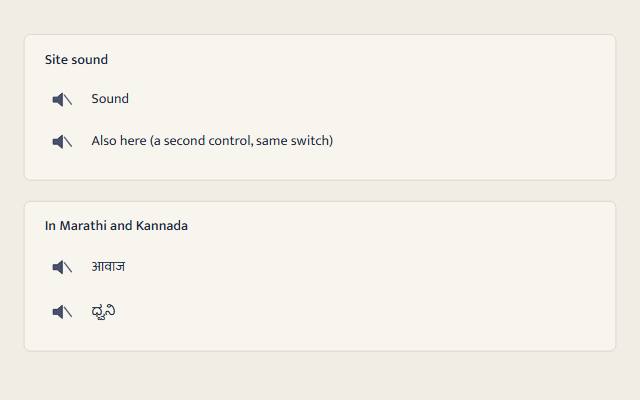
The one control that turns Susegad's sound switch on or off, site-wide, over a native checkbox with role=switch. Checking it is the user's own gesture, so switch.js can resume the audio context right there and play the switch's own confirmation.
quiet warm playful
Open the live demo
npx susegad add sound-switch
Stands on: Core, Core: components, Sound, Tokens
The prompt
the prompt
The one control that turns a page's sound on or off, and the user's own gesture for doing it.
<link rel="stylesheet" href="susegad/components/sound-switch/sound-switch.css">
<script type="module" src="susegad/components/sound-switch/sound-switch.js"></script>

<sg-sound-switch>
  <label><input type="checkbox" role="switch"> Sound</label>
  <small class="sg-sound-switch-note">Turning sound on needs JavaScript.</small>
</sg-sound-switch>
The prompt
Make a sound switch web component over a native <input type="checkbox" role="switch">: the checkbox is the whole control, it reads and writes one shared on/off setting stored in localStorage, and checking it is the only thing on the page allowed to make the first sound, because that click is the user's own gesture. Without JavaScript the checkbox still exists and is still announced as a switch, but nothing it does has an effect, since there is no sound without JavaScript; say so in a small note next to it, and hide that note once the element is running. Give it three registers. Quiet: the plain switch, no drawing. Warm: draw a small speaker beside the track, with a line struck through it when the switch is off and two arcs of sound in its place when it is on, faded between the two on a CSS transition under 200ms. Playful: the same speaker, but while the switch is on and the element is on screen, breathe the two arcs gently from seeded noise, so two switches on the same page never pulse in step, and hold them still under reduced motion, in quiet motion, or off screen. Keep every switch on the page in sync with the shared setting, so checking one checks them all.
Words to code
| When you say | Technique | What happens |
|---|---|---|
| the checkbox is the whole control | native first | static native = 'input[type="checkbox"]'; role="switch" is added if missing. The component adds role and a drawing only; the checkbox carries the keyboard, focus and screen-reader behaviour on its own. |
| reads and writes one shared on/off setting stored in localStorage | shared state | soundOn()/setSoundOn() (packages/sound/switch.js) own localStorage['sg-sound'], wrapped in try/catch. The element only calls them; it holds no state of its own. |
| checking it is the only thing … allowed to make the first sound | consent | setSoundOn() runs inside the checkbox's own change handler, itself a user gesture, which is exactly when switch.js is allowed to resume the shared AudioContext. Turning it on also calls play('confirm') right there, so the tap and the first sound are the same gesture. |
| nothing it does has an effect … say so in a small note | fallback | sound-switch.css shows a <small class="sg-sound-switch-note"> by default and hides it only once the element sets data-ready, which only happens with JavaScript running. |
| a line struck through … two arcs of sound | redundancy | SPEAKER in sound-switch.core.js holds the body, two arc paths and a slash as plain SVG path data. [data-on] on the drawing shows the arcs and hides the slash, or the reverse; the state is a shape, never colour alone. |
| breathe the two arcs gently from seeded noise … never pulse in step | noise | pulse(t, seed) reads Perlin noise seeded by the element (its seed attribute or id), so no two switches share a phase. waveAnimation(motion, on, seed) samples it into Web Animations keyframes, or returns null to hold still. |
| keep every switch on the page in sync | shared state | Every instance calls onSoundChange(on => …) and writes the checkbox back only when it disagrees, so one page can hold as many switches as it likes without an event loop. |
Accessibility
role="switch"on the native checkbox; the label you write is what is read.- The drawing is
aria-hidden="true"; nothing about the switch's state is said only by a shape or a colour. - Forced-colours mode brings back the system's own control and hides the drawing.
- The no-JS note keeps the page honest: it never implies sound works where it cannot.
<sg-sound-switch> is the one control that turns Susegad's sound switch on or off, site-wide. It wraps a native <input type="checkbox" role="switch">; the checkbox is the whole control.
Use
<link rel="stylesheet" href="susegad/components/sound-switch/sound-switch.css">
<script type="module" src="susegad/components/sound-switch/sound-switch.js"></script>

<sg-sound-switch>
  <label><input type="checkbox" role="switch"> Sound</label>
  <small class="sg-sound-switch-note">Turning sound on needs JavaScript.</small>
</sg-sound-switch>
Put one anywhere a page offers the setting: a header, a settings panel, the first scene that would use sound. More than one on a page stay in sync with each other, because they all read and write the same switch (packages/sound/switch.js).
What it does
- On connect, the checkbox is set to
soundOn(). Checking or unchecking it callssetSoundOn()from inside the browser's ownchangeevent, so that click or key press is the user gestureswitch.jsneeds to resume the sharedAudioContext: turning sound on and hearing the first sound can be the same tap. Turning it on also playsconfirm, the switch's own first sound. - Every
<sg-sound-switch>on the page listens forsg-sound-changeand follows: check one, and the rest (and anything else readingsoundOn()) update without a page reload. - Without JavaScript the checkbox is still there, still announced as a switch, and still takes Space — but nothing it does has an effect, because there is no sound without JavaScript. A
<small class="sg-sound-switch-note">beside it says so in words; this element hides that note once it is running.
Attributes
| Attribute | Values | Default |
|---|---|---|
register | quiet, warm, playful | inherited |
seed | any string (playful only: which arc breath this switch plays) | the element's id, or a fixed default |
Registers
| Look | Motion | |
|---|---|---|
| quiet | the native switch, hairline, no drawing | none |
| warm | a small speaker beside the track; a struck-through line when off, two arcs when on | the switch fades between the two on a CSS transition, under 200ms |
| playful | the same speaker; the two arcs also breathe gently while it is on | a slow Web Animation, seeded so two switches never pulse in step; paused off screen and under reduced motion |
Accessibility
- The checkbox carries
role="switch"; a screen reader says "switch, Sound, on" or "off", from the<label>text you write. - The speaker drawing is
aria-hidden; the state is never carried by the drawing alone, only by the checkbox itself. - Forced-colours mode returns the system's own checkbox in the system's own colours; the drawing is hidden.
- The "needs JavaScript" note means the no-JS page never implies sound is available when it is not.
Budget
| File | Bytes |
|---|---|
sound-switch.js + sound-switch.core.js (behaviour) | within 12 KB |
skins/quiet.js | well under 8 KB |
skins/warm.js | well under 8 KB |
skins/playful.js | well under 8 KB |
Nothing runs per frame except a playful switch's single Web Animation, while it is on and on screen.