Site nav
A site header that works with no JavaScript: the page links sit in a native details, a Menu button on narrow screens and a row on wide ones, with the current page in aria-current. No dialog or drawer.
quiet warm playful
Open the live demo
npx susegad add site-nav
Stands on: Core, Core: components, Engine, Tokens
The prompt
the prompt
The header of a small static site: a studio, a homestay, a clinic, a shop.
A brand link and a handful of page links that work with no JavaScript, with the current page marked.
<link rel="stylesheet" href="susegad/components/site-nav/site-nav.css">
<script type="module" src="susegad/components/site-nav/site-nav.js"></script>

<sg-site-nav>
  <nav aria-label="Main">
    <a class="sg-site-nav-home" href="/">Casa Studio</a>
    <details class="sg-site-nav-menu">
      <summary>Menu</summary>
      <ul>
        <li><a href="/">Home</a></li>
        <li><a href="/work/" aria-current="page">Work</a></li>
        <li><a href="/now/">Now</a></li>
      </ul>
    </details>
  </nav>
</sg-site-nav>
The prompt
Make a site header nav web component that works with JavaScript off. Put the page links in a native <details> whose <summary> says Menu. On a narrow container that summary is the menu button; from 40rem wide, hide the summary and show the links as a row by overriding the closed disclosure's ::details-content, but only inside @supports selector(::details-content), so a browser without it keeps the summary and its links stay one press away. With JavaScript, open the disclosure on wide screens where that selector isn't supported, close the open menu on Escape and give focus back to the summary, and, only if the server marked nothing, mark the current page with aria-current from the URL (an exact match is the page; a folder above it marks its section; the home link never marks a section). Don't use a dialog or a drawer; leave the summary as the one place a drawer could take over later. Give it three registers. Quiet: plain links over a hairline rule, the current page underlined. Warm: the links in the hand, over a pencil rule, with a two-pass pencil line under the current page, fitted to its width. Playful: stamped tabs, each a double-ruled label set down at its own slight angle, the current one inked solid in the accent colour.
Words to code
| When you say | Technique | What happens |
|---|---|---|
| a native details whose summary says Menu | native first | The disclosure opens and closes with no script, by mouse, touch and keyboard. |
| overriding the closed disclosure's ::details-content | CSS | @container (min-width: 40rem) { @supports selector(::details-content) { summary { display: none } details::details-content { content-visibility: visible } } }. |
| only inside @supports | fallbacks | Without the selector, the summary never hides, so no link is ever out of reach. The check found the unguarded version hid every link on a wide screen. |
| mark the current page … from the URL | pure core | current(hrefs, pathname) and normalizePath() (index.html and trailing slashes don't count). |
| Escape … focus back to the summary | keyboard | A keydown on the open disclosure, on narrow screens only. |
| a two-pass pencil line … fitted to its width | noise | pencilLine(w, seed) rises a little to the right as a hand does; a ResizeObserver refits it. |
| set down at its own slight angle | seeded tilt | tabTilt(seed, i), 0.6 to 2.4 degrees, as --sg-nav-tilt. |
Accessibility
- A named
<nav>; the element names it "Main" if the markup doesn't. - The current page is
aria-current="page"(or"true"for its section), not only a colour or underline. - Links and the Menu button are at least 44 px tall.
- Forced colours: the current page keeps a border and the pencil line uses LinkText.
<sg-site-nav> is a site header: a brand link and the page links, in a native <details> that is a Menu button on narrow screens and a row of links on wide ones. It needs no JavaScript.
Markup
| Element | What it is |
|---|---|
<nav aria-label> | required |
a.sg-site-nav-home | optional brand link |
details.sg-site-nav-menu with <summary> | the disclosure; the summary's words are the menu button's |
<ul> of <li><a> | the page links; mark the current one aria-current="page" |
Mark the current page on the server (in Astro: compare Astro.url.pathname). If none is marked, the element marks one from location.pathname with current() from site-nav.core.js, which a build step can call too.
Behaviour
| Width of the element | Without JavaScript | With JavaScript |
|---|---|---|
| under 40rem | Menu button (the summary); press to show the links | the same, and Escape closes the open menu |
| 40rem and over | a row of links, summary hidden (::details-content) | the same; where ::details-content is missing, the element opens the disclosure and hides the summary |
Without JavaScript in a browser that lacks ::details-content, the Menu button stays on wide screens too. No link is ever hidden without a way to it.
Registers
| Look | |
|---|---|
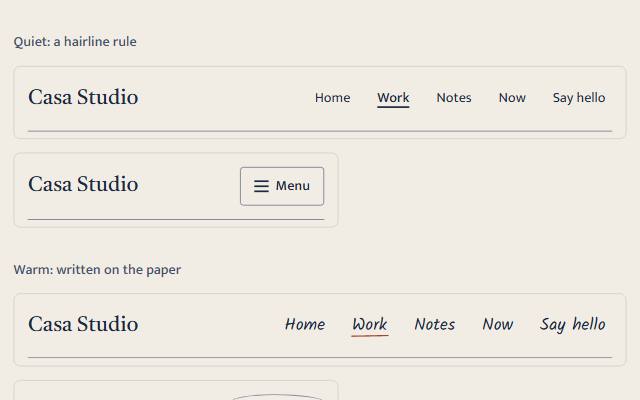
| quiet | plain links over a hairline rule; the current page underlined |
| warm | links in the hand over a pencil rule; a pencil line under the current page |
| playful | stamped tabs at slight angles; the current tab inked in the accent colour |
Nothing moves in any register.
The Wave 5 seam
The <summary> is the only part that a drawer would replace. With <sg-drawer> on the page, swap the summary's disclosure for <a href="/menu/" data-sg-drawer="site-menu">Menu</a> (a real page without JavaScript) and move the <ul> into the drawer. The marking of the current page and the registers don't depend on the disclosure.
Accessibility
- A named nav, a current page in
aria-current, 44 px targets. - The narrow menu is a disclosure, not a dialog: focus isn't trapped and the page behind stays usable.